📣 Webhook, Telegram, Discord and Slack alerts
Besides email alerts, the engine can send notifications to messaging services: generic webhook, Discord, Slack, Microsoft Teams and Telegram.
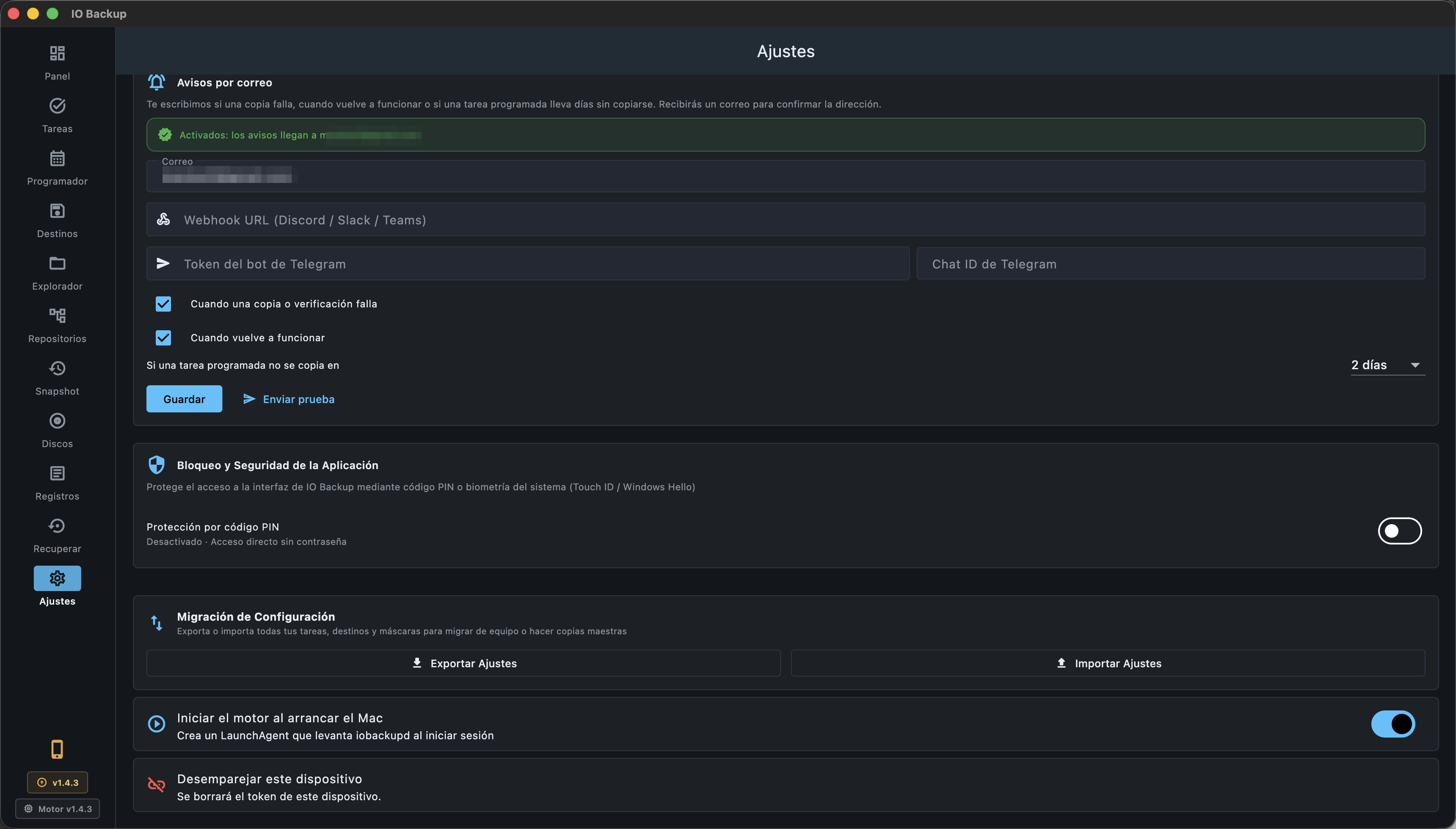
Configuration
In Settings → Alerts:
- Webhook URL: paste the service URL. The app detects the format and adapts the message:
- Discord:
https://discord.com/api/webhooks/… - Slack:
https://hooks.slack.com/… - Teams: channel webhook from "Connectors".
- Generic: any endpoint that accepts a JSON POST.
- Telegram: bot token (the one @BotFather gives you) + the chat ID where you want to receive notifications. You can have several channels at once.
The Test button sends a real notification instantly — verify the URL before relying on it.
What it reports
- Failed backups and their reason.
- Backups that start working again after failing.
- Tasks that haven't run successfully for too many days.
Best practices
- Telegram and Discord are the most immediate for personal use: the notification arrives like any other message.
- For teams: a dedicated Slack/Teams alerts channel keeps them from getting lost in email.
- Webhooks travel over HTTPS — the notification text includes no sensitive data, only the backup status.