🔔 Tray and menu bar icons
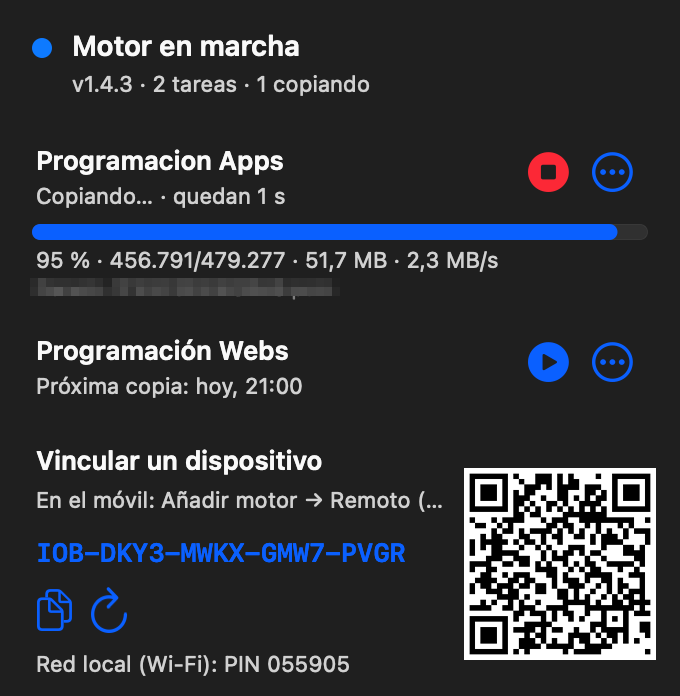
Even when you close the app, the engine stays visible through its own icon:
Windows — iobackup-tray.exe
- Tray icon alongside the app (installed with it, startup via HKLM).
- Shows service and backup status; menu with quick actions.
- Talks to the engine over local HTTP (no TLS, localhost) with its own limited token.
macOS — IO Backup Menu.app
- Menu bar icon (its own LaunchAgent).
- Reads the engine status and shows the same summary.
What they show
- Engine status (active/copying/verifying/busy).
- Active transfers with animation: percentage, elapsed time, ETA and task detail — watch the backup progress without opening the app.
- Latest results per task.
Limited token ("Engine icon")
The app registers the icon as just another client, with read-only/action permissions (menubar.json / tray.json):
- The icon cannot create tasks or touch sensitive configuration — only view and act on its own scope.
- With its own icon running, the app doesn't show its own (on Windows, only when the tray is already running).
If the icon doesn't appear
- Windows: check that
iobackup-tray.exeis running (Task Manager) — the app restarts it when opened. - macOS: check the
dev.iobackup.menubarLaunchAgent and that the engine is running.